We want to make it as easy as possible for you to contact us. So we've placed Live Chat on our website for to talk directly to a member of Contact Centre team.
Simply click on the Chat icon (at the bottom of your screen) and talk in real-time. Live Chat is manned Monday to Friday, from 9 am to 5 pm.
Can't see the Live Chat icon?
if you're logged into the myThrive hub, you will need to enable the relevant cookies. Click on the purple 'Privacy settings' tab at the bottom left of your screen and tick 'Live Chat'. Close the tool and the Chat icon will appear.
Image
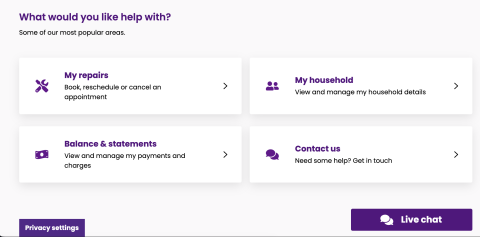
If you are not logged in, you can speak to our team through our website. Just click here.
When's the best time to speak to someone?
Our quieter periods tend to be after 1 pm Tuesday to Friday but of course, if you have an emergency call us on 0800 917 6077 24 hours a day, 7 days a week.